
For cafés
The café schedule, without the group chat
With a part-time team the schedule changes every week. Collect availability in Shiftrio, publish the plan, and sort out swaps and empty shifts in the app.
Free for up to 10 people · Every feature on every plan
Scenes every café knows
It’s Monday and the schedule still isn’t done; who’s free when got lost in the messages.
IN SHIFTRIO
Ask the team for their availability and everyone tells you in the app which days they can work. Auto-assign skips anyone who isn’t available.
The barista called in sick and Saturday morning is empty.
IN SHIFTRIO
Open the shift to the team; the first person who can work it and asks gets it. No more “can anyone come in?” in the group.
A student on your team wants to change shifts in exam week.
IN SHIFTRIO
They offer a swap in the app, their colleague accepts, you approve. The schedule updates and the people affected get a notification saying what changed.
Your café’s week in Shiftrio
Availability in one place
Employees tell you in the app which days they can work. Before you plan, you can ask the team to update theirs.
Empty shifts open to the team
Open a shift nobody is on; the first to ask gets it, and you’re told who.
Weekly hour limits
Give each employee a minimum and maximum of weekly hours; auto-assign skips anyone who has hit theirs.
Employees see their own week
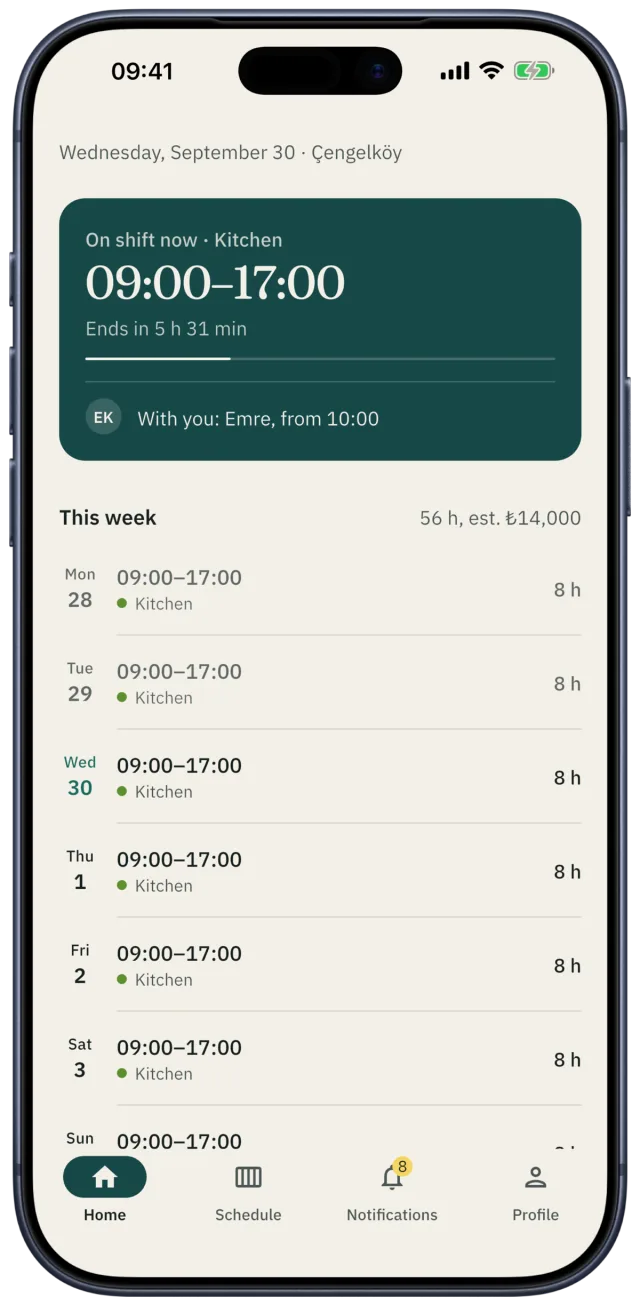
Their next shift, who they work with, their hours this week and estimated pay are on their home screen. They can add shifts to their phone’s calendar.
Team announcements
A new menu, a till rule, a meeting time: send an announcement and see who has read it.
The tip jar on record
Split the tips equally or by hours worked; the split stays on record in the app.
A common café shift pattern
An example for a café that opens early and closes in the evening. With a part-time team, short shifts keep the plan flexible.
| Shift | Hours | What for |
|---|---|---|
| Morning | 07:30–13:30 | Opening and the breakfast rush |
| Midday | 11:00–17:00 | The lunch rush, covering the morning crew’s breaks |
| Evening | 16:00–22:00 | Evening service and closing |
Rules in Turkey when you plan shifts
- Working time is at most 45 hours a week. By agreement it can be spread unevenly across the days, but never more than 11 hours a day.
- Breaks: 15 minutes for up to 4 hours of work, half an hour for up to 7.5 hours, an hour beyond that. Breaks don’t count as working time.
- Night work (20:00–06:00) can’t exceed 7.5 hours.
- Everyone gets a weekly rest of at least 24 hours in a row within every 7 days.
Source: Turkish Labour Law No. 4857, Articles 46, 63, 68 and 69.
Free tools
- Shift schedule template
An Excel and PDF template for the weekly schedule.
- Tip pool calculator
Split the tips by hours, by points or equally, to the cent.
- Timesheet template
Who worked which day of the month, on leave or off sick: Excel and PDF.
Questions
- How do I make a café schedule?
- Collect your team’s availability first. Then place short shifts around the morning, lunch and evening rush. Keep everyone within their maximum weekly hours and leave each person at least 24 hours of rest in a row in every 7 days.
- How do I keep track of part-timers’ hours?
- Shiftrio’s statistics show how many shifts and hours each person worked this month on one screen. Employees see their own weekly hours and estimated pay, and a summary at the end of the month.
- Can employees swap shifts?
- Yes. They offer a swap in the app; the other person accepts first, then you approve. An approved swap goes onto the schedule.
- Does everyone have to install the app?
- No. You can add someone who hasn’t joined yet and schedule them. When they install the app and join, their shifts move to their own account.
- How many employees are free?
- Up to 10 employees are free. Every feature is on every plan; as your team grows you upgrade in the app.
Getting started
Publish this week’s café schedule in Shiftrio.
Download the app, add your business and invite your team on WhatsApp. No computer needed to set it up.
Free for up to 10 employees. Every feature on every plan. iPhone and Android.