
For restaurants
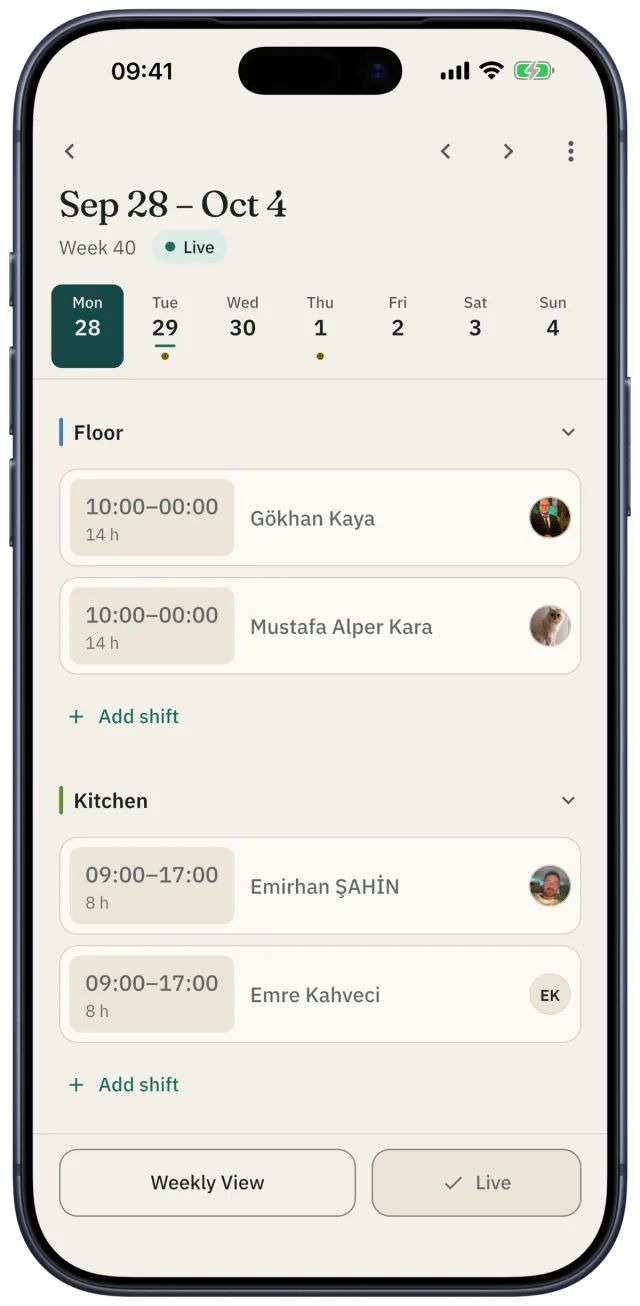
The restaurant schedule, on your phone
Plan the week for the floor, the kitchen and the bar in Shiftrio. Once you publish, everyone sees their own shifts on their phone; time off, swaps, overtime and tips live in the same place.
Free for up to 10 people · Every feature on every plan
Scenes every restaurant knows
Friday night, two people in the kitchen. Someone was on leave and nobody remembered.
IN SHIFTRIO
Approved time off shows on the schedule and auto-assign skips those days. Set a rule like “at least three in the kitchen on Friday” and Shiftrio warns you when the week falls short.
A server swapped their Saturday with a friend and nobody told you.
IN SHIFTRIO
Swaps are asked for in the app: the other person accepts first, then you approve. Who swapped with whom stays on record.
At the end of the month, tips and overtime are worked out from memory.
IN SHIFTRIO
Overtime is recorded with its multiplier. Tips are split equally or by hours worked; when someone asks who got what, the answer is there.
Your restaurant’s week in Shiftrio
Floor, kitchen and bar as departments
Each department has its own place on the schedule. Enter your opening hours and the shift times you use most, once.
Fill the week in minutes
Start from a saved template or let auto-assign do it: it skips anyone on leave, anyone who said they’re unavailable and anyone who has hit their weekly hours.
Publish, and everyone sees it
One tap publishes it and everyone gets a notification. You see who has seen the schedule and can remind the rest.
The week’s labour cost
While you plan, the week’s total hours and their estimated cost at each person’s hourly wage sit above the schedule.
Open an empty shift to the team
If someone drops out, open the shift to the team; the first person who can work it and asks for it gets it, and you hear who did.
Tips and overtime
Split the month’s tips equally or by hours worked, and record overtime with its multiplier. At the end of the month it’s all in one list.
A common restaurant shift pattern
An example for a restaurant with a lunch and a dinner rush. Adjust the times to your own opening hours.
| Shift | Hours | What for |
|---|---|---|
| Opening | 09:00–17:00 | Kitchen prep, opening the floor, lunch service |
| Mid | 12:00–20:00 | Bridges the lunch and dinner rush |
| Closing | 16:00–24:00 | Dinner service, cleaning and cashing up |
Rules in Turkey when you plan shifts
- Working time is at most 45 hours a week. By agreement it can be spread unevenly across the days, but never more than 11 hours a day.
- Breaks: 15 minutes for up to 4 hours of work, half an hour for up to 7.5 hours, an hour beyond that. Breaks don’t count as working time.
- Night work (20:00–06:00) can’t exceed 7.5 hours.
- Everyone gets a weekly rest of at least 24 hours in a row within every 7 days.
Source: Turkish Labour Law No. 4857, Articles 46, 63, 68 and 69.
Free tools
- Shift schedule template
An Excel and PDF template for the weekly schedule.
- Tip pool calculator
Split the tips by hours, by points or equally, to the cent.
- Timesheet template
Who worked which day of the month, on leave or off sick: Excel and PDF.
- Annual leave calculator
How many days of annual leave Turkish law gives, and how many are left.
Questions
- How do I make a restaurant schedule?
- Start with your departments (floor, kitchen, bar) and your opening hours. Then place opening, mid and closing shifts around the lunch and dinner rush. Write down how many people each department needs on each day, and collect time off and availability before you start.
- Can I plan the kitchen and the floor separately?
- Yes. Each department shows separately on the schedule and each shift belongs to one. Minimum headcount rules can be set per department too.
- Does it work for part-time servers?
- Yes. Give each employee a minimum and maximum of weekly hours; auto-assign skips anyone who has hit theirs. Employees see their own weekly hours and estimated pay.
- Can I split tips in the app?
- Yes. Enter the tips collected in a month; Shiftrio splits them equally or by the hours of that month’s published shifts and keeps the record. For the Turkish points method, use the free tip pool calculator.
- How many employees are free?
- Up to 10 employees are free. Every feature is on every plan; as your team grows you upgrade in the app and your data stays as it is.
Getting started
Publish this week’s restaurant schedule in Shiftrio.
Download the app, add your business and invite your team on WhatsApp. No computer needed to set it up.
Free for up to 10 employees. Every feature on every plan. iPhone and Android.