
For shops
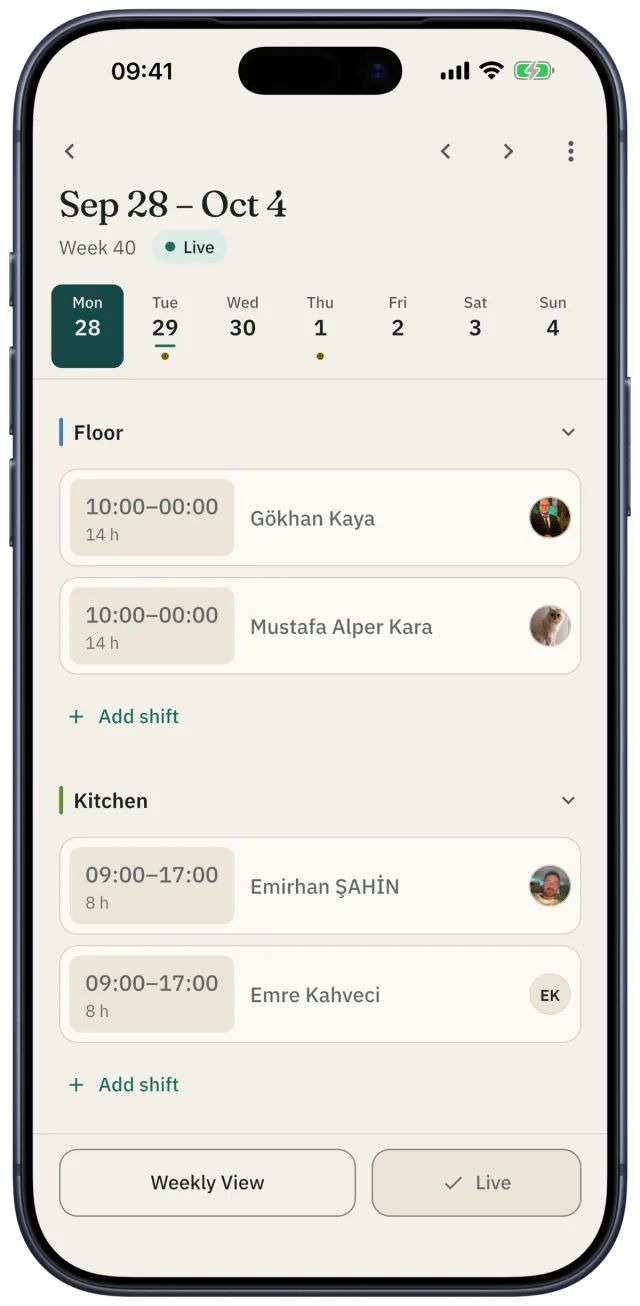
The store schedule, every location in one place
Plan opening and closing crews, weekend rushes and more than one location in Shiftrio. Once you publish, every employee sees their own shifts; when something changes, only the people affected hear about it.
Free for up to 10 people · Every feature on every plan
Scenes every shop knows
Both people with a key are off on the same day. Who opens the store?
IN SHIFTRIO
Give keyholders a “Key” tag and set a rule of “at least one person tagged Key every day”; Shiftrio warns you about any day that falls short.
The schedule changed and the news stayed in the WhatsApp group; half the team missed it.
IN SHIFTRIO
The people a change affects get a notification saying what changed. You see who has seen the schedule and can remind the rest.
At the end of the month staff costs are over budget and nobody noticed.
IN SHIFTRIO
The week’s estimated labour cost shows while you plan. Overtime is recorded with its multiplier, and the statistics show who worked how many hours.
Your store’s week in Shiftrio
Opening and closing crews
Enter the store’s opening hours and save the shift times you use most; when you add a shift you pick its times from the list.
Tills, floor and stockroom as departments
Each department has its own place on the schedule. Set minimum headcount rules by department, day or tag.
Every location
Switch between branches with one tap and give each its own manager; an employee can work at more than one.
The week’s labour cost
The week’s total hours and their estimated cost at each person’s hourly wage sit above the schedule.
Time off and swaps you approve
Employees ask in the app. For a swap the other person accepts first, then you approve; approved time off shows on the schedule.
Who worked how much
The statistics show how many shifts and hours each person worked this month. Employees get their own hours, overtime and pay at the end of the month.
A common retail shift pattern
An example for a mall store open 10:00–22:00. Add a mid shift on weekends and sale days.
| Shift | Hours | What for |
|---|---|---|
| Opening | 09:30–17:30 | Getting ready to open and daytime sales |
| Mid | 13:00–21:00 | The afternoon and weekend rush |
| Closing | 14:30–22:30 | Evening sales, the tills and closing up |
Rules in Turkey when you plan shifts
- Working time is at most 45 hours a week. By agreement it can be spread unevenly across the days, but never more than 11 hours a day.
- Breaks: 15 minutes for up to 4 hours of work, half an hour for up to 7.5 hours, an hour beyond that. Breaks don’t count as working time.
- Night work (20:00–06:00) can’t exceed 7.5 hours.
- Everyone gets a weekly rest of at least 24 hours in a row within every 7 days.
Source: Turkish Labour Law No. 4857, Articles 46, 63, 68 and 69.
Free tools
- Shift schedule template
An Excel and PDF template for the weekly schedule.
- Timesheet template
Who worked which day of the month, on leave or off sick: Excel and PDF.
- Annual leave calculator
How many days of annual leave Turkish law gives, and how many are left.
Questions
- How do I make a retail staff schedule?
- Split your opening hours into opening and closing shifts, and add a mid shift for weekends and sale days. Decide how many people the tills and the floor need each day, and collect time off and availability before you start.
- Can I run more than one store from one account?
- Yes. One account runs every location; give each its own manager, and an employee can work at more than one.
- How do I see staff costs?
- Enter each employee’s hourly wage once; while you plan, the week’s total hours and estimated labour cost sit above the schedule.
- Do employees hear when the schedule changes?
- Yes. The people a change affects get a notification saying what changed. You also see who has seen the schedule.
- How many employees are free?
- Up to 10 employees are free. Every feature is on every plan; as your team grows you upgrade in the app.
Getting started
Publish this week’s store schedule in Shiftrio.
Download the app, add your business and invite your team on WhatsApp. No computer needed to set it up.
Free for up to 10 employees. Every feature on every plan. iPhone and Android.